How ScrollGuard Works (Without Collecting What You Watch)
ScrollGuard does its work locally on your phone, not on an external server. Whatever shows up in your Instagram, YouTube, or TikTok feed stays between you and your phone. We don't read it, store it, or need it for the app to work.
Is ScrollGuard safe to use?
Yes. ScrollGuard is safe to use because it never gets access to the things a harmful app would want. It doesn't route your traffic through a VPN. It doesn't send what you scroll past or watch to us or to anyone else. Every blocking decision is made on your phone, in real time, and there is no server-side record of it.
If you only want the short version, this is what "safe" means here:
- No social media credentials. You sign in to each platform directly, the same way you would anywhere else. ScrollGuard never sees or stores the password.
- No VPN and no traffic inspection. Your network traffic never passes through us, so there is nothing for us to read.
- No ad SDKs, no data sales. ScrollGuard is funded by Pro subscriptions. There is no second business model that depends on knowing what you watch.
- Reviewed by both app stores. ScrollGuard is distributed through Google Play and the Apple App Store, so every release goes through the stores' review processes, and it has been installed more than 200,000 times.
- A public track record. The Android version has been live on Google Play since January 2024, with more than 100,000 installs on that store alone. The listing, ratings, and reviews are all public, so you can check them before installing.
The rest of this page explains how each of those holds up on iPhone and Android, and what we deliberately left out to keep it that way.
How blocking actually happens
The exact mechanism differs between iPhone and Android, because the two platforms give apps very different levels of access. The design choice underneath is the same on both: the rules live on your phone, the blocking work happens on your phone, and nothing about what you scroll past, watch, or block is sent anywhere.
On iPhone
On iPhone you don't usually have to remember to open ScrollGuard. The setup walks you through creating an Apple Shortcuts automation: when you tap the Instagram, YouTube, or Facebook icon on your home screen, the automation hands you off to ScrollGuard's filtered version of that app instead. The native app stays installed, so DMs, comments, and notifications still come through. The part you actually scroll happens inside ScrollGuard. There's also a ScrollGuard home-screen widget if you'd rather launch from there with one tap.
Once you're inside, ScrollGuard loads the page with your blocking rules already in place. The rules are simple patterns: "if a page element looks like a Reel, hide it" or "remove the Shorts shelf from this layout." Closer to a config than a program.
The matching and hiding happens locally, on your phone, every time the page loads. None of what gets matched, scrolled past, or watched is sent anywhere. The app doesn't need any of it to work.
Everything happens on your phone: the rules, the page loading, and the decisions about what to hide.
On Android
On Android, ScrollGuard uses the Accessibility service to detect what's on screen and block Reels, Shorts, and any other content you've chosen to block. When you turn on this permission, the system shows a warning that sounds alarming:
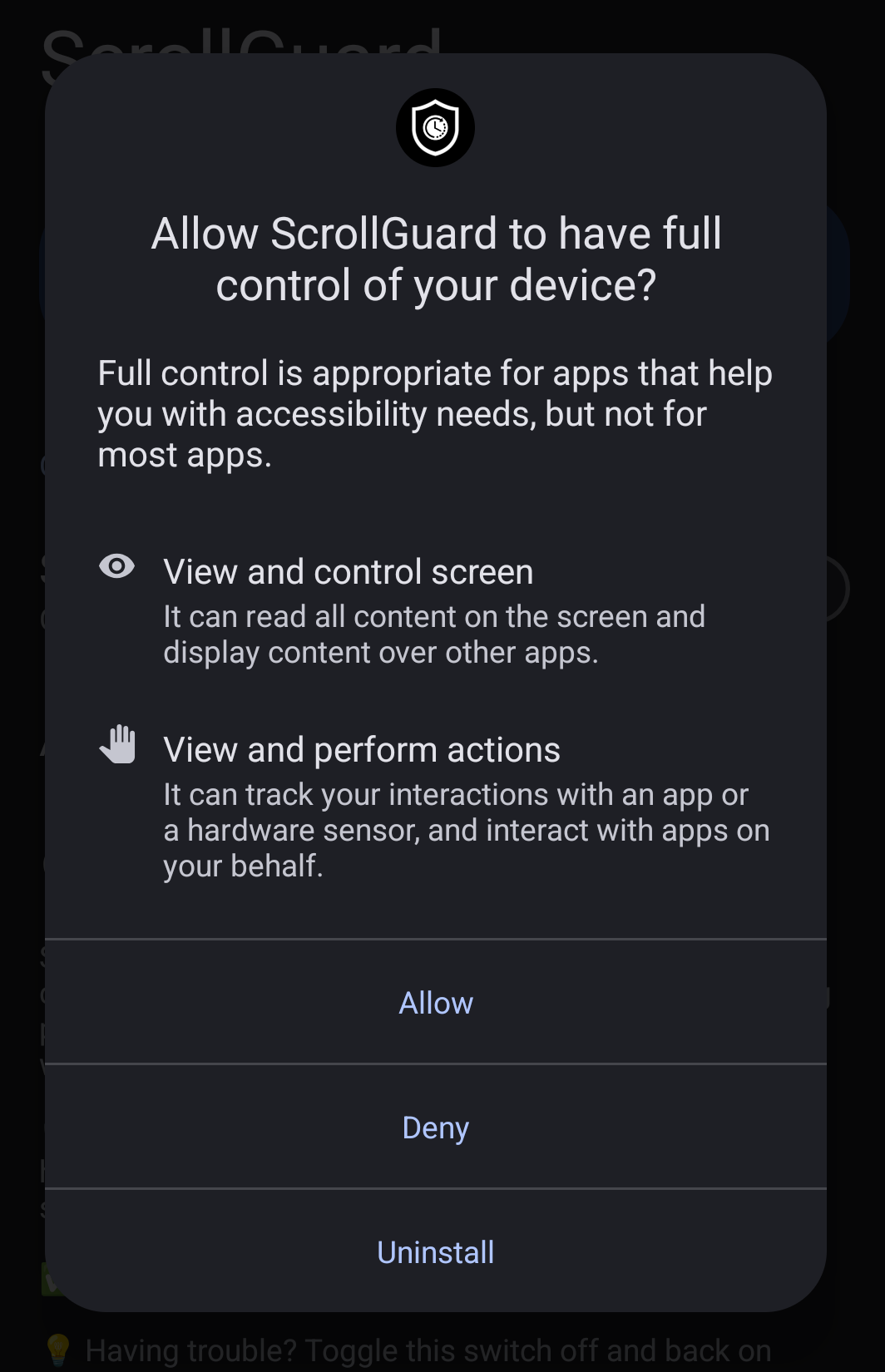
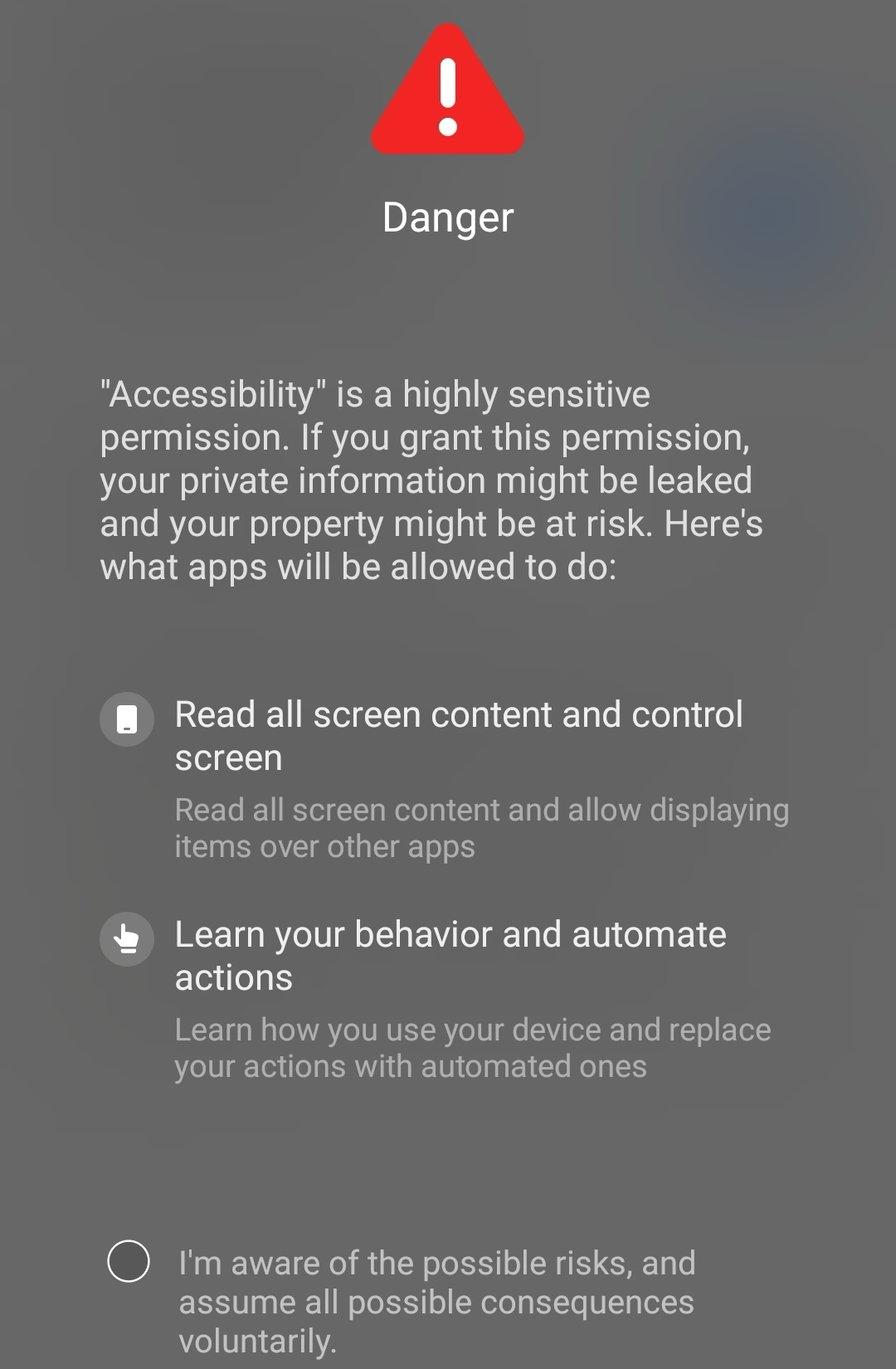
This permission is needed so ScrollGuard can recognize the parts of the screen that match your blocking rules and hide them as they appear. The patterns are simple: "if something here looks like a Reel, hide it" or "remove the Shorts shelf from this view." Closer to a config than a program. And all of it happens on your phone, with nothing about what's on screen sent anywhere.
The wording on Android's accessibility warning is broad because the permission itself is broad. The same API covers screen readers, remote-control tools, password managers, and a long list of other use cases, so the system warns aggressively about all of them at once. The API itself is narrower than the warning suggests. It hands an app a stream of accessibility events: changes to the screen layout and the UI nodes currently visible. ScrollGuard reads that stream to recognize when a Reel or a Shorts shelf appears, and hides it. That's nothing close to a screen recording or "full access" to your data. If you want to verify, the API is public and fully documented: see Google's AccessibilityService and AccessibilityEvent references.
Everything happens on your phone: the rules, the recognition, and the decisions about what to hide.
What we deliberately skipped
A few things we sometimes get asked about:
- Your social media login doesn't pass through ScrollGuard. When you sign into Instagram, YouTube, or TikTok from inside ScrollGuard, those credentials go directly to those services, the same way they would if you signed in anywhere else. We don't store your password, and we don't share it with anyone.
- We don't run a VPN on your phone. A lot of screen-time and parental-control apps do, which means they can see your traffic. We took a different path for this reason.
- There are no third-party trackers in the app itself. No advertising SDKs, no Facebook pixel, no fingerprinting. (We do use a couple of normal services for crash reports and subscription billing, scoped to app events, not your browsing.)
Why we're not interested in your data
We can't reach your data, and we built it that way on purpose. The work that ScrollGuard does happens on your phone, so what you scroll past or watch never crosses out of your device. There is no server-side log we're choosing not to look at. The log doesn't exist.
The incentives line up the same way. ScrollGuard is funded by Pro subscriptions, not advertising or data sales. There's no investor pressure to push tracking into the app, and adding any would actively damage what subscribers pay for.
Frequently Asked Questions
Is ScrollGuard safe to use?
Yes. The app runs locally on your phone and doesn't share what you do inside it with us or anyone else. It doesn't ask for your social media credentials, and the blocking decisions are made on your device, in real time.
Can ScrollGuard see what I scroll past or watch?
The blocking decisions are made on your phone, in real time, and nothing about them gets sent anywhere. We don't have a record of what you scrolled, watched, or skipped, because we don't collect it.
Do I need an account to use ScrollGuard?
No. ScrollGuard itself doesn't ask you to sign up. You'll still need to be signed into Instagram, YouTube, or TikTok to see your own feed inside the app, the same as you would anywhere else.
Does ScrollGuard sell my data?
No. ScrollGuard is paid for by Pro subscriptions. The product exists because subscribers want a blocker that doesn't collect or sell their data.
Sources
- Google. AccessibilityService. Android Developers API reference.
- Google. AccessibilityEvent. Android Developers API reference.
- Apple. Shortcuts User Guide. Apple Support.
Block the feed, keep your phone private
ScrollGuard removes Reels, Shorts, and other addictive feeds without sending your browsing anywhere.