Instagram Without Reels: How to Block Them in 2026 (4 Methods)
Key Takeaways
- Instagram doesn't officially let you turn off Reels. The Reels tab and Suggested Reels can't be permanently removed, but there are four ways to get an Instagram-without-Reels experience.
- The "Following" feed is a solid free trick that hides suggested content and the bottom navigation bar, but it requires you to manually switch every time you open the app.
- Desktop + browser extension is the most thorough free method, but you lose the convenience of having Instagram on your phone.
- ScrollGuard is the best option if you want to keep Instagram on your phone without Reels. It removes only the addictive content you choose while keeping DMs, stories, and your regular feed fully functional. Available as a freemium app on both iPhone and Android.
Can You Actually Disable Instagram Reels?
Short answer: not officially. Instagram doesn't let you turn off the Reels tab or fully remove Reels from the app. But you can get very close to an Instagram-without-Reels experience with one of four methods: hiding the Suggested Reels section, switching to the "Following" feed, using Instagram on desktop with a browser extension, or installing ScrollGuard to block Reels entirely on your phone. Each method has tradeoffs, covered below.
The Real Problem With Instagram Reels
You know how it goes. A friend sends you a meme on Instagram. You open the app just to reply. It'll take ten seconds. But then a Reel catches your eye. Then another. Thirty minutes later, you've burned through your entire daily screen time allowance and you haven't even replied to the message yet.
The problem isn't that you use Instagram. You need it to stay in touch with friends, check stories, and message people. The problem is how you end up using it. Reels are specifically designed to keep you scrolling: an endless feed of short videos, each one algorithmically chosen to hold your attention just a little longer. One study found that short-form video feeds can trigger dopamine loops similar to slot machines, making it genuinely difficult to stop once you start.
The good news? You don't need to delete the app. There are several ways to block or reduce Instagram Reels while keeping everything else you actually use. This guide walks through four methods, from quick built-in settings to dedicated tools, with the honest pros and cons of each. If YouTube Shorts is the same problem in another app, the companion guide on how to block YouTube Shorts uses the same "remove the feed, keep the app" approach. The same logic applies to blocking the TikTok For You feed.
Method 1: Hide Suggested Reels From Your Feed
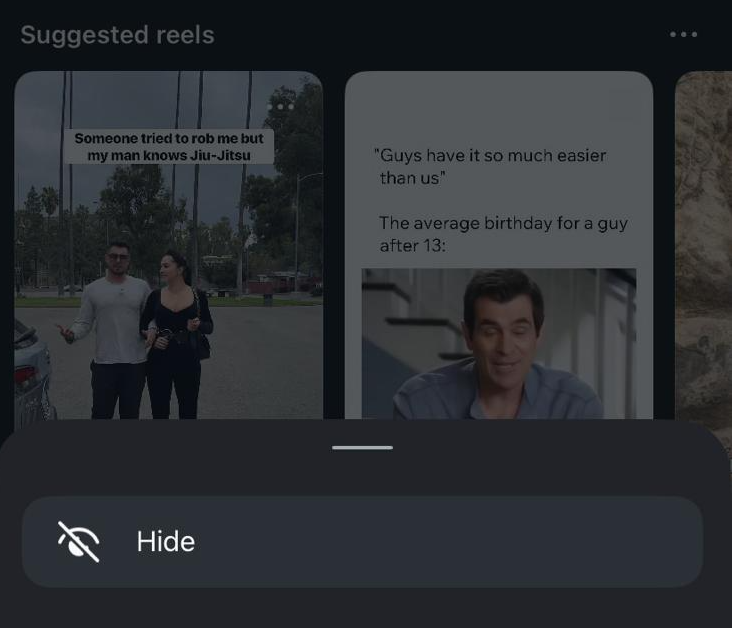
Instagram's home feed often includes a "Suggested Reels" section between posts from people you follow. You can hide this section directly from the feed. If the bigger issue is the psychology behind the loop itself, our explainer on why TikTok is so addictive breaks down the dopamine and variable-reward side.
How to do it
- Open Instagram and scroll your home feed until you see the "Suggested Reels" section.
- Tap the three dots (⋮) in the top-right corner of that section.
- Tap "Hide".
What it actually does
This removes the "Suggested Reels" carousel from your main feed. However, it only hides that one suggested section. Regular Reels that are posted by accounts you follow will still appear as normal posts in your feed. More importantly, the Reels tab at the bottom of the screen is still there, and it's still just one tap away from an infinite scroll session.
Pros
- Quick and free, takes five seconds
- Reduces Reels in your main feed
Cons
- Only hides the "Suggested Reels" section. Reels from accounts you follow still appear
- The Reels tab remains fully accessible at the bottom of the screen
- The trigger is still there: one accidental tap and you're back in the loop
Method 2: Switch to the "Following" Feed
Instagram lets you switch from the default algorithmic feed to a chronological feed that only shows content from accounts you follow. This is one of the most underused features on the app.
How to do it
- Open Instagram and go to your home feed.
- Tap the Instagram logo or the dropdown arrow at the top-left of the screen.
- Select "Following".
What it actually does
When you're in the "Following" feed, Instagram shows you posts only from people you follow, in chronological order. No suggested content, no algorithmic recommendations. You may still see some Reels, but only ones posted by people you actually follow.
There's a nice side effect too: while you're in the "Following" feed, the bottom navigation bar disappears, which means the Reels tab is no longer staring at you. This removes one of the biggest visual triggers.
Pros
- Free and built into Instagram
- Removes all suggested/algorithmic content
- Hides the bottom navigation bar (including the Reels tab)
- Shows a clean, chronological feed from people you chose to follow
Cons
- You have to manually switch to "Following" every time you open the app because Instagram resets to the algorithmic feed
- Reels posted by people you follow still appear
- If you navigate away (to DMs, search, etc.) and come back, you may land on the default feed again
Method 3: Use Instagram on Desktop With a Browser Extension
If you're willing to stop using Instagram on your phone entirely, the desktop web version combined with a browser extension can completely eliminate Reels from your experience.
How to do it
- Delete the Instagram app from your phone (or log out).
- Use instagram.com in your computer browser instead.
- Install a browser extension that blocks Reels and Shorts content (there are several available for Chrome and Firefox).
What it actually does
This is the most thorough free method. By moving Instagram to your computer, you remove all the phone-based triggers: no notifications pulling you in during idle moments, no quick-tap access when you're bored in line, and no Reels tab in your pocket. A browser extension can then hide whatever remains of short-form video content on the web version.
Pros
- Completely removes phone-based triggers
- Browser extensions can block Reels entirely on the web
- Free
Cons
- You lose the convenience of having Instagram on your phone
- No quick access to DMs, stories, or the camera when you're out
- You can't post stories or use Instagram's camera features from the browser
- Requires discipline to not just reinstall the app
Method 4: Use ScrollGuard to Block Reels on Your Phone
If you want the best of both worlds, keeping Instagram on your phone while fully removing Reels, ScrollGuard is built exactly for this.
How it works
ScrollGuard is a freemium app available on both iPhone and Android. Instead of blocking the entire Instagram app, it targets only the addictive parts. You choose exactly what to block:
- Block the Reels tab entirely so it's no longer accessible
- Block Reels in the feed so they don't appear as you scroll
- Allow Reels only in DMs, so you can still watch the memes your friends send without falling into the infinite feed
- Block Stories, Explore, or other feeds if you want even more control
- Schedule Breaks (Android), time windows where blocking pauses (e.g. Sunday evenings) and locks back automatically, so you can stay strict the rest of the week without going all-or-nothing
Everything else works normally: DMs, posting photos, browsing your feed, checking profiles. You keep the app, you keep your social life, and you remove the part that wastes your time.
Pros
- Keep Instagram on your phone with full functionality (DMs, stories, posting)
- Fully removes Reels and other addictive content. Not just hidden, but blocked
- Highly customizable: choose exactly which features to block
- Works on both iPhone and Android
- Freemium, with core features available for free
Cons
- Some advanced features require a paid plan
- Requires installing a separate app
Which Method Is Right for You?
It depends on how much control you need and whether you want to keep Instagram on your phone.
| Method | Removes Reels? | Keep Phone App? | Cost |
|---|---|---|---|
| Hide Suggested Reels | Partially | Yes | Free |
| Following Feed | Mostly | Yes | Free |
| Desktop + Extension | Fully | No | Free |
| ScrollGuard | Fully | Yes | Freemium |
If you just want a quick reduction in Reels, start with Method 1 or Method 2. They're free and take seconds. If you want a complete solution while keeping Instagram on your phone, ScrollGuard is the only option that fully blocks Reels without sacrificing the features you actually need.
Remove vs Block vs Disable Reels: Which One Do You Actually Need?
The four methods above cover three different intents: removing Reels from your feed (Methods 1 & 2), disabling Reels in the browser (Method 3), and fully blocking Reels on your phone (Method 4). Most people searching for "no Reels Instagram" want the last one: the Reels tab gone, the Suggested Reels gone, the Reels in Stories gone. Only Method 4 delivers that on mobile.
If you've tried Method 1 or 2 and still find yourself sucked in by a single Reel that slipped through, that's the signal that the half-measures aren't enough. The trigger is still there, and your brain is good at finding triggers. The dopamine loop doesn't care which app the Reel is in.
Frequently Asked Questions
Can I completely remove the Reels tab from Instagram?
Instagram doesn't offer a built-in setting to remove the Reels tab. The "Following" feed hides the bottom navigation bar while you're using it, but the tab comes back when you navigate elsewhere. ScrollGuard is the only way to fully block the Reels tab on your phone.
Will hiding suggested Reels stop all Reels from appearing?
No. Hiding suggested Reels only removes the "Suggested Reels" carousel from your main feed. Reels posted by accounts you follow will still appear as regular posts, and the Reels tab remains accessible.
Does the "Following" feed stay selected permanently?
No. Instagram resets to the default algorithmic feed every time you close and reopen the app. You'll need to manually switch to "Following" each time.
Is ScrollGuard free?
ScrollGuard offers a freemium model. Core features like blocking Reels are available for free. Advanced customization options are available with a paid plan.
Can I still watch Reels my friends send me in DMs?
Yes. With ScrollGuard, you can configure it to allow Reels only in DMs, so you can still view memes and videos your friends share directly with you without being exposed to the infinite Reels feed.
Does blocking Reels affect my Instagram account?
None of these methods affect your Instagram account. You won't lose followers, posts, or any data. These methods only change what you see in the app on your device.
Sources
Keep Instagram. Lose the Reels.
ScrollGuard blocks Reels and other addictive feeds while keeping DMs, stories, and your regular feed working perfectly.